Published
Altrady - Crypto Academy brings you a step by step process to set up your Altrady crypto trading experience!
Altrady, is your choice to trade cryptocurrency in 2020! https://altrady.com/?utm_source=youtube&utm_medium=share&utm_term=balance-notifications&utm_content=balance-notifications&utm_campaign=altrady-crypto-academy
Join traders community and ask them why Altrady is the best crypto trading platform in 2020 - https://discord.gg/s5DuEhh
QUICK SCAN
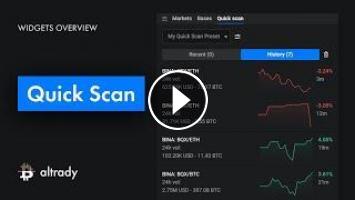
The Quick Scan widget lets you find the markets that experience a sudden and big price change, either drop or rise.
To start receiving Quick Scan alerts, you need to set up the Quick Scan filter. Click the settings icon, then:
- Create your first preset by clicking the “Plus” icon
- Enter the preset name and click “Save”
- Select a time frame for the price change (You can choose among 5, 10, 15 and 30 minutes time frame)
- Select notification sound for Rise, Drop and Fat Finger alerts and check if you want to receive a desktop notification
- Now you need to add a rule
- Select the exchange you want to find markets on
- Type in the markets or currencies you want to receive notifications for
- Remove low volume markets by setting a minimum 24-hour volume, you can set either in BTC or USD
- Set alert thresholds, for the drop, rise, and fat finger; (you can disable each of the alert types if you don’t need them)
- The first rule is ready and you can create another one if needed.
Below the rules, you can exclude some markets from the scanner by market name, currency, or by a minimum price. It helps to avoid “barcode” charts that are hard to trade.
Lastly, make sure to save your preset and wait for the next alert.
Once you receive an alert, you will see one or more items on the Quick Scan widget, here you can see:
- The market name
- 24 hour volume in USD and BTC
- Chart preview
- The drop or rise percentage and how much time ago that happened
Clicking on any of these items will open a chart and will replace the currently open
chart. However, you can also right-click the item to find the menu to:
- Open a market (replacing current chart)
- Open in a new tab
- Exclude the market, to prevent it from showing up again
- Copy market name
- Add the market to a watch list and assign the watch list tag color
No matter if you want to invest in Bitcoin or explore altcoins, Altrady is here to serve as your ultimate trading platform.
#crypto #academy #bitcoin #learn
Altrady, is your choice to trade cryptocurrency in 2020! https://altrady.com/?utm_source=youtube&utm_medium=share&utm_term=balance-notifications&utm_content=balance-notifications&utm_campaign=altrady-crypto-academy
Join traders community and ask them why Altrady is the best crypto trading platform in 2020 - https://discord.gg/s5DuEhh
QUICK SCAN
The Quick Scan widget lets you find the markets that experience a sudden and big price change, either drop or rise.
To start receiving Quick Scan alerts, you need to set up the Quick Scan filter. Click the settings icon, then:
- Create your first preset by clicking the “Plus” icon
- Enter the preset name and click “Save”
- Select a time frame for the price change (You can choose among 5, 10, 15 and 30 minutes time frame)
- Select notification sound for Rise, Drop and Fat Finger alerts and check if you want to receive a desktop notification
- Now you need to add a rule
- Select the exchange you want to find markets on
- Type in the markets or currencies you want to receive notifications for
- Remove low volume markets by setting a minimum 24-hour volume, you can set either in BTC or USD
- Set alert thresholds, for the drop, rise, and fat finger; (you can disable each of the alert types if you don’t need them)
- The first rule is ready and you can create another one if needed.
Below the rules, you can exclude some markets from the scanner by market name, currency, or by a minimum price. It helps to avoid “barcode” charts that are hard to trade.
Lastly, make sure to save your preset and wait for the next alert.
Once you receive an alert, you will see one or more items on the Quick Scan widget, here you can see:
- The market name
- 24 hour volume in USD and BTC
- Chart preview
- The drop or rise percentage and how much time ago that happened
Clicking on any of these items will open a chart and will replace the currently open
chart. However, you can also right-click the item to find the menu to:
- Open a market (replacing current chart)
- Open in a new tab
- Exclude the market, to prevent it from showing up again
- Copy market name
- Add the market to a watch list and assign the watch list tag color
No matter if you want to invest in Bitcoin or explore altcoins, Altrady is here to serve as your ultimate trading platform.
#crypto #academy #bitcoin #learn
- Category
- Crypto Trading
- Tags

Be the first to comment
Up Next
Autoplay
-
01:39

Markets | Crypto Academy | Bitcoin and Altcoin Trading
-
00:48
My Orders | Crypto Academy | Bitcoin and Altcoin Trading
-
00:56
Device Activation | Crypto Academy | Bitcoin and Altcoin Trading
-
01:00
Balance & Notifications | Crypto Academy | Bitcoin and Altcoin Trading
-
01:03
Alerts | Crypto Academy | Bitcoin and Altcoin Trading
-
01:03
Market Header | Crypto Academy | Bitcoin and Altcoin Trading
-
02:21
Bases | Crypto Academy | Bitcoin and Altcoin Trading
-
00:32
Trades | | Crypto Academy | Bitcoin and Altcoin Trading
-
02:45
Altrady Onboarding | Crypto Academy | Altcoin Trading and Bitcoin
-
00:39
Market Depth | Crypto Academy | Bitcoin and Altcoin Trading
-
02:56

WESLER.biz New Bitcoin Mining 2020 | 100 GH/s Bounce | Free BTC Mining Cloud mining legit 2018
-
02:45

Bitcoin Mining site_free bitcoin mining site_1 Day earning upto $10 2pac Miner
-
01:33

How to Hack Bitcoin Wallet Hack Coinbase wallet Bitcoin Generator July 09 2020
-
00:21

NEW BEST FAST FREE BITCOIN MINING SITE 2021 + Legit
-
07:28

New Free Bitcoin Cloud Mining Site 2020 | Best Bitcoin Mining Site| Earn bitcoin Fast And Easy 2020
-
01:41

BITCOIN GENERATOR FREE BITCOIN MINER 2021 100% LEGIT BITCOIN MONEY ADD
-
08:33

Make $4019+ EVERY DAY With These Bitcoin Mining Apps (New Method 2021)