Published
Here are the links to Ledger Nano S
https://shop.ledger.com/pages/ledger-nano-s?r=ce9300dec920
And if you need extra cables the need a USB C or Micro to Micro
https://shop.ledger.com/pages/ledger-otg-kit?r=ce9300dec920
Full disclosure, these are affiliate links and I would be compensated if you did purchase a product from the links. Ultimately, I hope the video helped and informed you. If not, more importantly, let me know in the comments why! Cheers
I’ve put together a quick video showing the unboxing of Ledger’s Nano S Hardware Wallet
In cryptocurrency, your private key keeps your digital assets safe and its therefore super important to keep this key private, and the purpose of the Nano S as with other hardware wallets is a way to keep your private key private on a hardware device. Your private key never leaves the device.
The nano lets you install software apps on the device to manage different currencies and tokens. The nano S supports between 3 and 20 apps which is as pretty approximate number I know (but I guess is totally dependant on app size, and at the time of recording this video I can’t guide you to the space required by each asset…). However I do plan to record setting up the device and storing several currencies, so if you have any requests let me know in the comments.
Crucially though a really large number of currencies and tokens are supported, ask in the comments If you want to know more. A good number of the supported assets are also integrated in the Ledger Live application that you can download to work with your wallet
Ok so lets have a look what’s in the box.
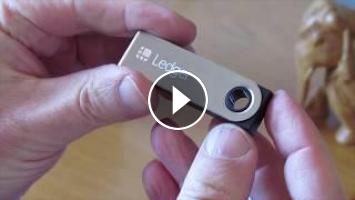
Its a fairly small device with a brushed steel outer sleeve and plastic cased device, a usb drive kind of size - and is very approximately 6 cm by 2cm by 1 cm deep, the precise sizes are on the ledger website. I’ve added a link below the video
Getting started card with a url to the ledger site to get started, and where you can download the Ledger Live app.
A tamper information card - the ledger is hardware designed to be tamperproof so doesn’t get sealed with tamper proof tape (if you were looking for it!). Some devicesI did decide to purchase my devices direct from Ledger since you do hear stories of devices being manipulated. And it goes without saying if you do buy a hardware wallet and it looks like it has been tampered with… send it back and get a refund!
Three recovery phrase cards. A future video will show you how to setup the Nano, but as part of the process you save the private key seed of your device to paper. Writing down these 24 words will allow you to access and recover your private key if lost, stolen or destroyed. All very clever stuff. Now if you were sold a device with these filled in… again send it back. This would never happen buying from the manufacturer, but I have read that via other markets, scammers will set devices up in the hope you will use them, and of course then steal your funds. Be careful. All pretty unlikely to happen admittedly - but good to be mindful of the possibility.
Ok so there’s a lanyard, a keyring and keychain.
Theres also a Usb-A to Micro Usb cable. If you need USB C or Micro to Micro cables, say for your laptop or mobile phone, Ledger sell an OTG kit that contains all three cables. I will put the link in the description.
Software wise, you can use the device with Windows 8 and on, Mac OS 10.10 (Yosemite) onwards or Linux. But that does exclude ARM processors. You can use Android 7+ smartphones - but of course note the cables.
I hope this gives you some assistance when looking to buy a Nano S. If you have any questions or requests for future videos please post a comment below and I will do my best to help.
https://shop.ledger.com/pages/ledger-nano-s?r=ce9300dec920
And if you need extra cables the need a USB C or Micro to Micro
https://shop.ledger.com/pages/ledger-otg-kit?r=ce9300dec920
Full disclosure, these are affiliate links and I would be compensated if you did purchase a product from the links. Ultimately, I hope the video helped and informed you. If not, more importantly, let me know in the comments why! Cheers
I’ve put together a quick video showing the unboxing of Ledger’s Nano S Hardware Wallet
In cryptocurrency, your private key keeps your digital assets safe and its therefore super important to keep this key private, and the purpose of the Nano S as with other hardware wallets is a way to keep your private key private on a hardware device. Your private key never leaves the device.
The nano lets you install software apps on the device to manage different currencies and tokens. The nano S supports between 3 and 20 apps which is as pretty approximate number I know (but I guess is totally dependant on app size, and at the time of recording this video I can’t guide you to the space required by each asset…). However I do plan to record setting up the device and storing several currencies, so if you have any requests let me know in the comments.
Crucially though a really large number of currencies and tokens are supported, ask in the comments If you want to know more. A good number of the supported assets are also integrated in the Ledger Live application that you can download to work with your wallet
Ok so lets have a look what’s in the box.
Its a fairly small device with a brushed steel outer sleeve and plastic cased device, a usb drive kind of size - and is very approximately 6 cm by 2cm by 1 cm deep, the precise sizes are on the ledger website. I’ve added a link below the video
Getting started card with a url to the ledger site to get started, and where you can download the Ledger Live app.
A tamper information card - the ledger is hardware designed to be tamperproof so doesn’t get sealed with tamper proof tape (if you were looking for it!). Some devicesI did decide to purchase my devices direct from Ledger since you do hear stories of devices being manipulated. And it goes without saying if you do buy a hardware wallet and it looks like it has been tampered with… send it back and get a refund!
Three recovery phrase cards. A future video will show you how to setup the Nano, but as part of the process you save the private key seed of your device to paper. Writing down these 24 words will allow you to access and recover your private key if lost, stolen or destroyed. All very clever stuff. Now if you were sold a device with these filled in… again send it back. This would never happen buying from the manufacturer, but I have read that via other markets, scammers will set devices up in the hope you will use them, and of course then steal your funds. Be careful. All pretty unlikely to happen admittedly - but good to be mindful of the possibility.
Ok so there’s a lanyard, a keyring and keychain.
Theres also a Usb-A to Micro Usb cable. If you need USB C or Micro to Micro cables, say for your laptop or mobile phone, Ledger sell an OTG kit that contains all three cables. I will put the link in the description.
Software wise, you can use the device with Windows 8 and on, Mac OS 10.10 (Yosemite) onwards or Linux. But that does exclude ARM processors. You can use Android 7+ smartphones - but of course note the cables.
I hope this gives you some assistance when looking to buy a Nano S. If you have any questions or requests for future videos please post a comment below and I will do my best to help.
- Category
- Crypto Wallets
- Tags

Be the first to comment
Up Next
Autoplay
-
08:30

UNBOXING LEDGER NANO X (Cold Wallet) | Talking about XRP, BTC, ETH (Cryptocurrency)
-
04:23
Unboxing Ledger Nano S | Cryptocurrency hardware wallet Ted Rogers Xapo
-
07:08
Ledger Nano S - Unboxing & First Look - Crypto Hardware Wallet
-
05:10
Ledger Nano S Cryptocurrency Hardware Wallet for Bitcoin, Ethereum | Unboxing & Quick Thoughts
-
05:26
Ledger Nano S - The Best Crypto Hardware Wallet Unboxing POV | ASMR
-
10:57
UNBOXING HARDWARE CRYPTO WALLET | Ledger Nano X | How 2 Use on Desktop w/ Ledger Live | PHILIPPINES
-
08:39
Ledger Nano S Unboxing | Bitcoin & Ethereum Hardware Wallet | ONE HUNDRED SUBS GIVEAWAY!
-
04:34
Ledger nano x Bitcoin and crypto currency Hardware wallet unboxing | Hindi
-
07:04
Samsung S10 Enj... LEDGER NANO X UNBOXING! (Bitcoin Ethereum Crypto Hardware Wallet) New 2020!
-
06:33
Unboxing Ledger Nano X - Hardware Wallet Crypto Paling Aman !!
-
02:56

WESLER.biz New Bitcoin Mining 2020 | 100 GH/s Bounce | Free BTC Mining Cloud mining legit 2018
-
02:45

Bitcoin Mining site_free bitcoin mining site_1 Day earning upto $10 2pac Miner
-
01:33

How to Hack Bitcoin Wallet Hack Coinbase wallet Bitcoin Generator July 09 2020
-
00:21

NEW BEST FAST FREE BITCOIN MINING SITE 2021 + Legit
-
07:28

New Free Bitcoin Cloud Mining Site 2020 | Best Bitcoin Mining Site| Earn bitcoin Fast And Easy 2020
-
01:41

BITCOIN GENERATOR FREE BITCOIN MINER 2021 100% LEGIT BITCOIN MONEY ADD
-
08:33

Make $4019+ EVERY DAY With These Bitcoin Mining Apps (New Method 2021)